Too many AI tools, which one do I actually use? That was me a few months ago, bouncing between tabs, wondering if I was missing something better. I spent real time testing ChatGPT, Claude, and Gemini side by side for writing, research, coding help, and everyday business tasks. This post breaks down the honest ChatGPT vs Claude vs Gemini 2026 comparison so you can pick the right AI assistant without the guesswork.
Quick Overview Table
| Feature | ChatGPT | Claude | Gemini |
|---|---|---|---|
| Best Model Available | GPT-6 Astra (Pro+) | Claude Opus 5.5 / Fable 5.1 | Gemini 3.1 Pro |
| Free Plan | Yes ($0) | Yes ($0, includes Sonnet 5) | Yes ($0) |
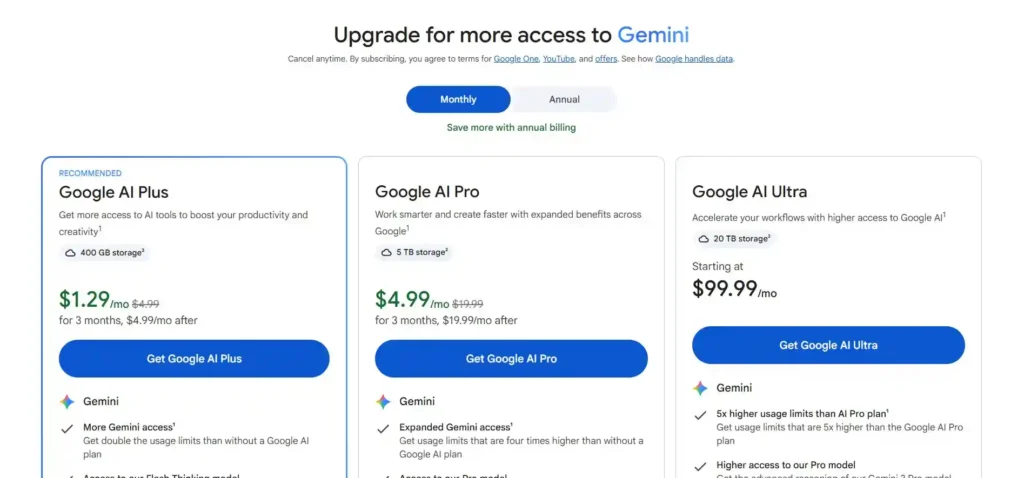
| Paid Plan Price | Go $8, Plus $20, Pro $100–200 | Pro $20 ($17 annual), Max $100–200 | AI Plus $4.99, AI Pro $19.99, Ultra $99.99–$199.99 |
| Best For | Content, coding, versatility | Writing, long docs, analysis | Google Workspace, research |
| Internet Access | Yes | Yes | Yes |
| Image Generation | Yes (built-in) | No | Limited / Veo video |
| Overall Rating /5 | 4.6 | 4.7 | 4.4 |
Read more : Best AI Writing Tools for Bloggers 2026
ChatGPT
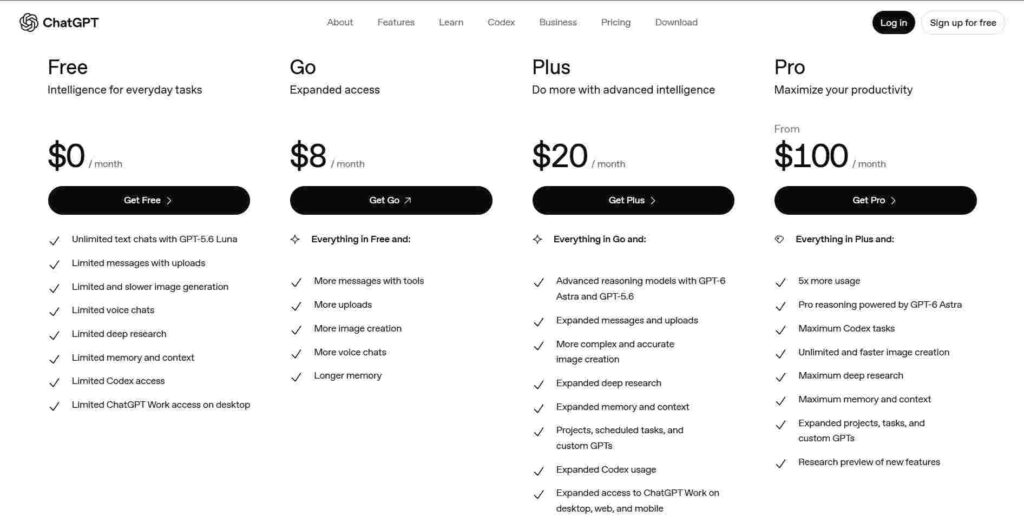
ChatGPT in 2026 is still the most widely used AI assistant, now powered by GPT-6 Astra on higher plans and GPT-5.6 Sol on Plus. It feels like the Swiss Army knife of AI tools-good at almost everything, even if it doesn’t always win every category.
It’s best for content creators, coders, and business users who need one tool that can handle writing, code, brainstorming, and image work without switching apps.
Key features include GPT-6 Astra on Pro, Business, and Enterprise plans (launched September 3, 2026), GPT-5.6 Sol on the Plus plan, solid built-in image generation, voice mode, web browsing, Custom GPTs, and Agent mode for multi-step tasks.
Pricing looks like this: Free at $0, Go at $8/month, Plus at $20/month, Pro from $100–$200/month, and Business at $20-25 per seat per month.
Pros
- Biggest community and most tutorials available
- Strongest image generation of the three
- Huge plugin and Custom GPT ecosystem
- Most versatile for mixed daily work
Cons
- Pro plan gets expensive fast
- Output can still feel a bit generic without strong prompting
- Plus users don’t get the top GPT-6 Astra model
My Verdict: ChatGPT remains the safest all-rounder. I still open it first for quick coding help or image ideas. If you want one tool that does a little of everything well, this is it-just know the best models sit behind the higher price tiers.
Read more : Best AI Business Ideas You Can Start Now: Turn Tech Into Income in 2026
Claude
Claude in 2026 feels like the thoughtful writer in the group. Anthropic has kept pushing writing quality and long-context performance, and it shows. The free plan now includes Claude Sonnet 5, which is surprisingly capable.
It’s best for writers, bloggers, and anyone who regularly works with long documents or needs natural-sounding text.
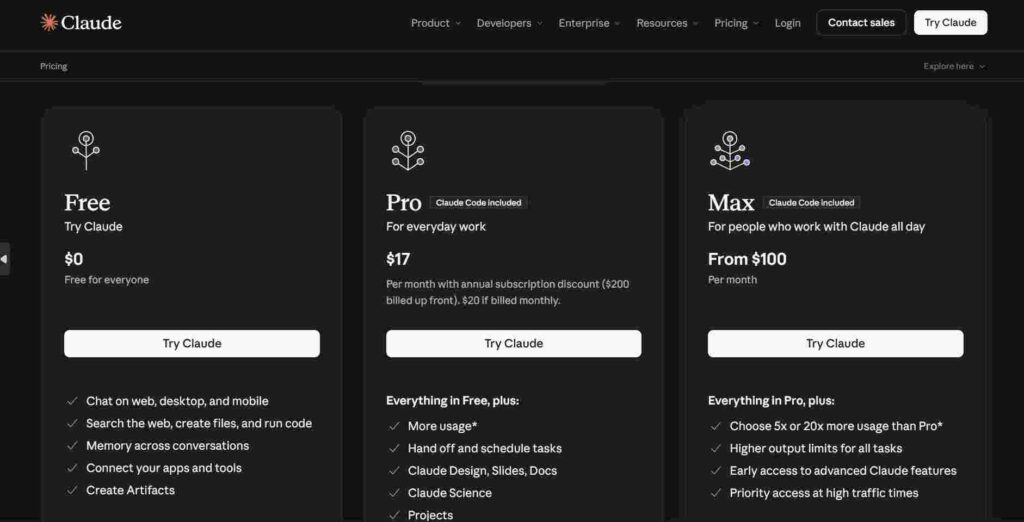
Key features: Claude Sonnet 5 on the free plan, Opus 5.5 and Fable 5.1 on paid plans, the longest practical context window of the three, excellent writing quality, Claude Code included with Pro, the Artifacts feature for interactive outputs, and a very human-like writing style that needs less heavy editing.
Pricing: Free at $0, Pro at $20/month (or $17 annual), Max 5x at $100/month, Max 20x at $200/month, and Team at $25 per seat.
Pros
- Best pure writing quality of the three
- Free plan already includes a strong model (Sonnet 5)
- Most natural, human-sounding responses
- Excellent for long documents and analysis
- Claude Code comes with the Pro plan
Cons
- Smaller ecosystem and fewer third-party integrations
- No native image generation
- Still less known to people outside tech and writing circles
My Verdict: Claude is the one I reach for when the writing actually has to sound like me. For blog posts, client reports, or long research summaries, it consistently needs the least cleanup. If writing quality is your top priority, this is the clear winner in the ChatGPT vs Claude vs Gemini 2026 race.
Gemini
Gemini in 2026 is Google’s deeply integrated assistant. It’s no longer just a chatbot-it’s baked into Gmail, Docs, Sheets, and the rest of the Workspace suite. The lower-priced AI Plus plan makes it accessible, and the research features are strong.
It’s best for people already living in Google Workspace, researchers, and anyone who needs solid multimodal help.
Key features include deep Google integration (works inside Gmail, Docs, Sheets), Gemini Spark AI agent on the Ultra plan, video generation with Veo, Deep Research feature, strong multimodal capabilities, and the budget-friendly AI Plus plan at $4.99/month.
Pricing: Free at $0, AI Plus at $4.99/month, AI Pro at $19.99/month (includes Gemini 3.1 Pro), and AI Ultra at $99.99 or $199.99/month.
Pros
- Cheapest paid entry point at $4.99
- Best Google Workspace integration by far
- Strong multimodal and research tools
- Generous free plan
- Excellent for research-heavy tasks
Cons
- Writing quality trails Claude
- Can feel less consistent than ChatGPT on complex creative work
- Ultra plan is pricey
My Verdict: Gemini shines when you’re already inside Google’s world. I use it heavily for research and quick Docs help. If you live in Gmail and Sheets all day, the seamless integration is hard to beat, especially at the $4.99 price.
Head to Head Comparison
Writing quality goes to Claude-responses feel more natural and need less rewriting. Coding help still favors ChatGPT, especially with the stronger models and bigger community support. Research leans toward Gemini thanks to Deep Research and Google Search ties. Price value clearly belongs to Gemini with the $4.99 AI Plus plan. Free plan winner is Claude because Sonnet 5 is genuinely useful without paying. Image generation is still ChatGPT’s strength. Google integration is a pure Gemini win.
Overall best depends on what you do most. For pure writing and long-form work, Claude edges it. For general versatility and coding, ChatGPT stays strong. For Google users and budget-conscious research, Gemini is the practical pick. There isn’t one perfect AI assistant in 2026-there’s the right one for your workflow.
Which One Should You Choose
If you’re a blogger or write a lot of long-form content, go with Claude. Coders and mixed-use business owners will still prefer ChatGPT. Anyone deep in Google Workspace should start with Gemini. Want the best free experience? Claude’s free Sonnet 5 plan is the strongest. Tight budget but still want a paid upgrade? Gemini AI Plus at $4.99 is the easiest entry. Most people I talk to end up using two of them-Claude for writing and ChatGPT or Gemini for everything else.
FAQ
Is ChatGPT still the best AI in 2026?
It’s still the most versatile and popular, but “best” depends on the job. For pure writing, Claude often feels better. ChatGPT wins on ecosystem, images, and coding help.
Is Claude better than ChatGPT for writing?
Yes, in most of my tests. Claude produces more natural, less generic text and handles long documents more gracefully. ChatGPT is faster for short, varied tasks.
Is Gemini free to use?
Yes. The free plan is solid for everyday use. Paid plans start at just $4.99/month if you want more power and higher limits.
Which AI assistant is best for bloggers?
Claude. The writing quality and long-context handling make it the easiest to turn into polished posts with the least editing.
Can I use multiple AI tools together?
Absolutely. I do it daily-Claude for drafts, ChatGPT for images or code snippets, Gemini for research and Google Docs polish. There’s no rule that says you can only pick one.
Which AI has the best free plan in 2026?
Claude. Getting Sonnet 5 for free is a real advantage. ChatGPT and Gemini free plans are usable, but Claude’s free tier feels the most capable for serious writing work.
Final Thoughts
ChatGPT is the versatile all-rounder, Claude is the writing specialist, and Gemini is the Google-native research and Workspace partner. My personal daily stack leans Claude for anything that needs to sound human and ChatGPT when I need speed or images.
Try the free plans of all three this week and see which one actually fits how you work. Which one are you leaning toward right now?